

The PS5 Pro is built for sharper, smoother games, so it deserves a monitor that can show them. The best gaming monitor for PS5 Pro has an HDMI 2.1 port for 4K at 120Hz with variable refresh rate, strong HDR and a fast panel, whether that means 4K, OLED or QD-MiniLED.
We picked 8 monitors using the specs on their Amazon listings. If you want the full overview, read our best gaming monitors for PS5, or jump to our 4K 120Hz guide and OLED monitor guide. Prices change often, so use the Check Price buttons.
The PS5 Pro renders more detail and holds higher frame rates than the base console, so the monitor matters more. A screen with HDMI 2.1, strong HDR and VRR lets the extra performance show instead of being wasted on a limited display.
Top 3 Best Gaming Monitors for PS5 Pro at a Glance


Best Gaming Monitors for PS5 Pro in 2027
Here are all eight PS5 Pro monitors side by side. Check the HDMI inputs on the listing if you want 4K at 120Hz.
| # | Monitor | Size / Resolution | Refresh | Panel | Best for |
|---|---|---|---|---|---|
| 1 | Sony INZONE M9 II | 27″ 4K UHD | 160Hz | Full-array LED | Best Overall for PS5 Pro |
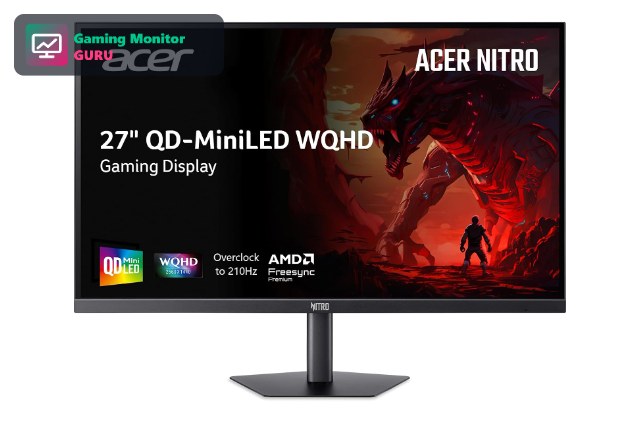
| 2 | Acer Nitro MG275U X2 | 27″ 1440p | Up to 210Hz | QD-MiniLED IPS | Best HDR Brightness |
| 3 | ASUS ROG XG27AQDMGR | 27″ 1440p | 240Hz | Glossy OLED | Best OLED for PS5 Pro |
| 4 | Sony INZONE M10S | 27″ 1440p | 480Hz | OLED | Best Fast OLED |
| 5 | LG UltraGear 27G810A-B | 27″ 4K UHD IPS | 180Hz (FHD 360Hz) | IPS | Best 4K IPS |
| 6 | AOC U32G4 32″ 4K | 32″ 4K UHD | Dual Mode 320Hz | G-SYNC compatible | Best Large 4K |
| 7 | Alienware 27 AW2725DM | 27″ 1440p | 180Hz | Fast IPS | Best 1440p Fast IPS |
| 8 | LG UltraGear 32GX850A-B | 32″ OLED | 4K | HDMI 2.1 OLED | Best 32-inch OLED |
1. Sony INZONE M9 II – Best Overall for PS5 Pro
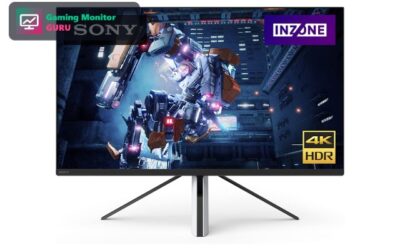
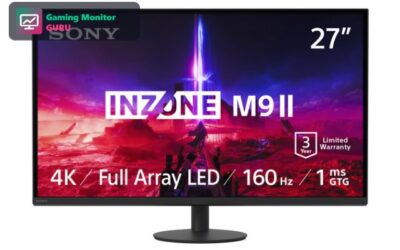
The INZONE M9 II is a 27-inch 4K monitor with full-array local dimming, DisplayHDR 600 and HDMI 2.1. It gives the PS5 Pro the 4K 120Hz path with HDR it needs.
It is the safest pick for a Pro owner who wants a premium all-round monitor.
It pairs well with the PS5 ecosystem, and features like Auto HDR Tone Mapping reduce setup time. It is a strong all-round choice.
Best for: PS5 Pro owners who want 4K, HDR and 120Hz.
May not fit if: you are on a budget.
2. Acer Nitro MG275U X2 – Best HDR Brightness
Acer’s Nitro MG275U X2 is a 27-inch QD-MiniLED IPS monitor with 2560×1440 resolution, a refresh rate up to 210Hz and an HDR1000 rating. It has two HDMI 2.1 ports, so a PS5 Pro and a PC can both connect.
It is a good choice for HDR lovers who prefer fast 1440p.
Brightness is the headline here. In HDR games with bright highlights, the extra output can make a visible difference.
Best for: players who want bright HDR at 1440p.
May not fit if: you want native 4K.
3. ASUS ROG XG27AQDMGR – Best OLED for PS5 Pro
ASUS’s ROG XG27AQDMGR is a 27-inch 1440p OLED monitor with a 240Hz refresh rate. OLED gives true blacks and very quick pixel response.
Check that its HDMI port supports the modes you want on PS5 Pro.
OLED motion clarity is excellent at 1440p, and the 27-inch size is easy to place on a desk.
Best for: players who want OLED contrast and speed.
May not fit if: you play in a very bright room.
4. Sony INZONE M10S – Best Fast OLED

Sony’s INZONE M10S is a 27-inch 1440p OLED with a 480Hz refresh rate and a 3-year OLED limited warranty. The PS5 Pro will not use the full speed, but the OLED panel will still look great.
It makes the most sense if you also own a powerful gaming PC.
The M10S favours speed. If you play competitive shooters on PS5 Pro, the fast response is the main draw.
Best for: players who also game on a high-end PC.
May not fit if: you only play on console.
5. LG UltraGear 27G810A-B – Best 4K IPS

LG’s 27G810A-B pairs a 4K IPS panel with HDMI 2.1 and VRR support. It is easy to connect and suits the PS5 Pro well.
The faster Full HD mode is useful if you also play on a PC.
IPS panels keep colours consistent from side angles, which is handy if you share the screen.
Best for: players who want an IPS 4K monitor.
May not fit if: you want the best HDR.
6. AOC U32G4 32″ 4K – Best Large 4K

AOC’s U32G4 is a 32-inch 4K monitor with a dual-mode refresh rate up to 320Hz. The large screen is a good match for a console setup on a bigger desk.
Check the listing for the HDMI version before buying for PS5 Pro.
At 32 inches, it suits sitting a little further back. Check the listing for the HDMI specification before ordering.
Best for: players who want a big 4K display.
May not fit if: you have a small desk.
7. Alienware 27 AW2725DM – Best 1440p Fast IPS

The AW2725DM is a 27-inch WQHD Fast IPS monitor with a 180Hz refresh rate and G-SYNC. The PS5 Pro can output 1440p, so it is a good fit for sharp, fast gaming.
It is a solid value pick if you prefer frame rate over native 4K.
1440p is easier to drive than 4K, so frame rates stay high. It suits players who value speed over pixel count.
Best for: players who prefer fast 1440p.
May not fit if: you want 4K.
8. LG UltraGear 32GX850A-B – Best 32-inch OLED

LG’s UltraGear 32GX850A-B is a 32-inch OLED aimed at players who want the best contrast. On PS5 Pro, dark scenes and HDR highlights gain depth that LCD panels struggle to match.
A larger panel at 4K stays sharp, and OLED response times make fast action look clean. It is a premium pick, so compare it against the Sony and ASUS OLED options in this list.
Use it in a dim room for the best result, and check the listing for the warranty terms covering image retention.
Best for: players who want a large OLED for HDR games on PS5 Pro.
May not fit if: you play in a bright room or leave static images on screen for long periods.
How to Choose a Gaming Monitor for PS5 Pro
HDMI 2.1 and 4K 120Hz
The PS5 Pro supports 4K at 120Hz over HDMI 2.1 with VRR. Choose a monitor that lists HDMI 2.1, like the Sony INZONE M9 II.
Use the cable included with the monitor or a certified Ultra High Speed HDMI cable, otherwise 4K 120Hz may not work.
HDR quality matters
The PS5 Pro supports HDR, and the difference between basic and strong HDR is large. Full-array local dimming, MiniLED or OLED all help.
Calibrate HDR in the PS5 system settings so the console knows the monitor’s brightness range.
4K or 1440p
4K matches the console output, while 1440p monitors are cheaper and faster. See our 4K monitor guide.
1440p can look very good at 27 inches, while 4K is the better choice from 32 inches.
OLED vs LCD
OLED has true blacks but costs more and can reflect light. LCDs with local dimming are brighter.
OLED has better contrast and motion, while MiniLED LCD is brighter and has no burn-in concern.
Ports and extras
Two HDMI 2.1 ports are handy if you also connect a PC. Check the warranty, especially for OLED.
Look for a USB hub, a height-adjustable stand and a headphone jack for console use.
Frequently Asked Questions
Do I need a new monitor for PS5 Pro?
Not necessarily, but a monitor with HDMI 2.1, VRR and good HDR lets you use the console’s features.
Not strictly, but a monitor with HDMI 2.1 and good HDR shows what the console can do.
Is a 4K monitor better for PS5 Pro?
4K matches the console’s output, but a good 1440p monitor can also look great.
Usually yes for detail, but a high-refresh 1440p screen can feel smoother.
Does PS5 Pro support 120Hz?
Yes, in supported games over HDMI 2.1.
It outputs 120Hz in supported games, and the monitor must have HDMI 2.1 to receive it at 4K.
OLED or MiniLED for PS5 Pro?
OLED has better blacks; MiniLED can be brighter. See our OLED guide.
Choose OLED for contrast in dark rooms and MiniLED for brightness in lit rooms.
Final Verdict
The Sony INZONE M9 II is the best overall PS5 Pro monitor here, the Acer Nitro MG275U X2 is the best HDR pick, and the ASUS ROG XG27AQDMGR is the best OLED.
Read our gaming monitor for PS5 guide for standard PS5 picks.
Write Your Review
No reviews yet. Be the first to share your experience!